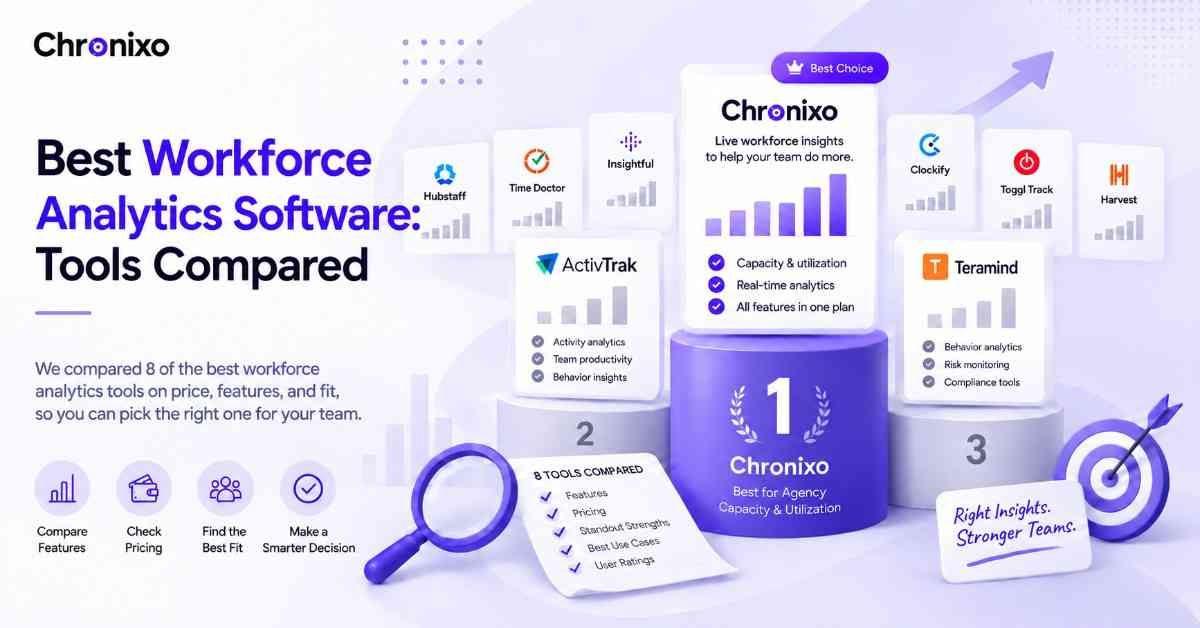
"Workforce analytics software" covers a wide range, from enterprise HR platforms that model attrition to operational tools that show you who's overloaded this week. This comparison focuses on the operational side: tools that turn real activity and time data into capacity, utilization, and productivity insight you can act on.
Key Takeaways
- There's no single best, there's a best for your team. Capacity planning, activity monitoring, and field tracking each point to a different tool.
- Chronixo leads for agency capacity and utilization. Live analytics on real time data, built into one $8/user/mo plan.
- Monitoring depth varies sharply, and so does the culture cost. Some tools lean heavy-surveillance; match the intensity to your team's trust level.
- Watch for add-on pricing. Several tools gate screenshots or key analytics behind paid add-ons, so the headline price understates the real cost.
- Live data beats imported data. Analytics built on a tool's own real-time tracking is more current and actionable than a platform fed by exports.
How We Compared These Tools
Each tool below is assessed on what actually decides a purchase: starting price, the standout capability that makes it worth choosing, the team type it fits best, and its verified user ratings from G2 and Capterra. Pricing reflects current published rates at the time of writing and can change, always confirm with the vendor. The aim is to help you shortlist quickly by matching each tool to a clear use case, rather than listing every feature.
The 8 Best Workforce Analytics Tools
1. Chronixo - Best for agency capacity and utilization analytics
Price: $8/user/month (every feature, one plan), 14-day free trial, no credit card. Chronixo is built for agencies and client-service teams that need to see and act on capacity, not model HR trends. Because it already tracks time and projects in one workspace, its analytics run on live data, giving a real-time view of utilization per person, capacity vs allocation, workload distribution, and overload alerts, without a separate system or imports.
Its standout is focus and honesty: rather than heavy surveillance or enterprise HR modeling, Chronixo shows the operational metrics agencies actually act on weekly, and does it transparently (screenshots, where used, can even route to your own storage). For teams whose real question is "who's overloaded and who has capacity," and for use cases like billable hours optimization for creative agencies, it's the most practical, best-value pick on this list.
Pros: Live capacity and utilization analytics on real time data; every feature in one $8/user/mo plan, no add-ons; transparent, agency-focused, not surveillance-heavy; combines analytics with time tracking and project management.
Cons: Focused on operational capacity, not enterprise HR modeling (attrition, engagement); newer than the established monitoring names.
2. ActivTrak - Best for employee activity and behavior analytics
Price: free for up to 3 users; paid $10-$19/user/month (annual only), with screenshots as a $2/user add-on. ActivTrak turns activity data into productivity dashboards and has leaned into "work intelligence" framing with team-health and capacity features on its top tier. It's a capable behavior-analytics tool, though the real cost climbs once you add screenshots, API, and support, and it's annual-billing only.
Pros: Detailed activity and productivity dashboards; free tier for up to 3 users; team-health and capacity features on Professional.
Cons: Screenshots and key integrations are paid add-ons; annual billing only; can feel surveillance-forward.
3. Teramind - Best for behavior analytics and insider-risk monitoring
Price: around $25/user/month at the higher tiers. Teramind combines behavior analytics, process optimization, and insider-risk management, giving a deep, security-oriented view of employee activity. It's powerful for compliance- and security-sensitive organizations, but its depth and monitoring intensity are more than most agencies need.
Pros: Strong insider-risk and behavior analytics; deep activity visibility; process-optimization tools.
Cons: Among the most expensive; monitoring can feel intrusive; heavier than most operational teams require.
4. Hubstaff - Best for field and remote teams needing GPS
Price: from around $4.99-$12/user/month depending on tier; 14-day trial. Hubstaff pairs workforce analytics with GPS, geofencing, and activity monitoring, making it a strong fit for field and mobile teams that need location accountability alongside productivity data. Its analytics are solid, though the monitoring can feel heavy for office or knowledge teams.
Pros: GPS and geofencing for field teams; activity and productivity analytics; automated payroll and invoicing.
Cons: Monitoring may feel intrusive for office teams; the interface has a learning curve.
5. Time Doctor - Best for productivity and time analytics
Price: from around $6.70-$9.99/user/month; no free plan. Time Doctor focuses on productivity analytics, activity tracking, distraction alerts, screenshots, and detailed time-use reports. It suits managers who want a clear picture of how work time is spent, with the usual trade-off that heavy monitoring can affect team trust.
Pros: Detailed productivity and time-use analytics; distraction alerts and screenshots; scales across team sizes.
Cons: No free plan; monitoring-forward; manual task switching.
6. DeskTime - Best for simple, affordable productivity analytics
Price: from around $7/user/month; limited free option. DeskTime offers automatic time tracking with productivity categorization, a straightforward way to see productive vs unproductive time across a team. It's affordable and easy to adopt, best for smaller teams wanting productivity insight without heavy configuration.
Pros: Affordable; automatic productivity categorization; easy to set up.
Cons: Lighter analytics depth than enterprise tools; limited capacity-planning features.
7. we360.ai - Best for affordable activity analytics
Price: budget-friendly per-user tiers. we360.ai provides workforce analytics through activity, attendance, and engagement tracking, with 100+ reports covering productivity and team performance. It's a low-cost option for teams wanting broad activity reporting, though it leans toward monitoring rather than capacity planning.
Pros: Affordable; extensive activity and attendance reporting; goal-setting and benchmarking.
Cons: Monitoring-oriented; less focus on capacity/utilization planning.
8. Visier - Best for enterprise predictive people analytics
Price: custom (enterprise). Visier is the outlier on this list, a dedicated, enterprise-grade people-analytics platform for advanced modeling, benchmarking, and predictive analytics (retention risk, workforce trends). It sits on top of existing HR systems and suits mature people-analytics teams, not operational capacity planning. Included here because it often appears in workforce-analytics searches, but it's a different category from the operational tools above.
Pros: Deep predictive and modeling capabilities; strong benchmarking; built for mature analytics teams.
Cons: Enterprise-only, high data-readiness required; overkill and cost-prohibitive for operational/agency use.
Quick Comparison Table
| Tool | Best for | Starting price | Free option |
| Chronixo | Agency capacity & utilization (all-in-one) | $8/user/mo | 14-day trial |
| ActivTrak | Activity & behavior analytics | $10/user/mo (annual) | Yes (3 users) |
| Teramind | Insider-risk & behavior analytics | ~$25/user/mo | No |
| Hubstaff | Field/remote teams + GPS | ~$4.99-12/user/mo | No (trial) |
| Time Doctor | Productivity & time analytics | ~$6.70-9.99/user/mo | No |
| DeskTime | Affordable productivity analytics | ~$7/user/mo | Limited |
| we360.ai | Affordable activity analytics | Budget tiers | Varies |
| Visier | Enterprise predictive analytics | Custom | No |
Chronixo shows utilization, capacity, and overload signals on live data, in one $8/user/mo plan, no add-ons, no surveillance-first design. Try it free for 14 days.
Start Free Trial →Which One Should You Choose?
Match the tool to the decision you're trying to make. If you're an agency or client-service team that needs to see and act on capacity and utilization, Chronixo is the most focused, best-value pick. If you need deep activity or behavior monitoring, ActivTrak or Teramind go further. For field teams, Hubstaff's GPS makes sense; for productivity time-tracking, Time Doctor or DeskTime; and for enterprise predictive HR modeling, Visier is the specialist, at enterprise cost.
One honest note on culture: several of these tools lean surveillance-heavy, which can erode trust if applied to the wrong team. If capacity and workload balance are your real goals rather than activity policing, prioritize tools built around that, which is exactly the approach in our workforce analytics software guide.
Next Steps
The best workforce analytics software is the one that answers your actual question, whether that's capacity, activity, or prediction, so shortlist two or three from the table and trial them against real data. If your goal is seeing and acting on team capacity without a separate platform or a surveillance-first design, Chronixo is built for exactly that. Start a 14-day free trial, no credit card, and see your team's real utilization from day one.